Deferred Tax Rate Calculator
Businesses are required to prepare financial statements according to accounting standards while also complying with tax regulations established by government authorities. Since accounting rules and tax laws often treat certain transactions differently, the profit reported in financial statements may not be the same as the profit used for tax purposes. These differences can create deferred tax assets or deferred tax liabilities that must be recognized and tracked properly.
Calculating deferred taxes manually can be complicated, especially when a company has multiple assets, liabilities, and temporary differences to consider. A Deferred Tax Rate Calculator Template helps simplify this process by organizing information and automatically calculating deferred tax amounts based on the applicable tax rate.
What is Deferred Tax?
Deferred tax arises when there is a temporary difference between the carrying amount of an asset or liability in the accounting records and its tax base. These differences cause taxes to be recognized in different periods for accounting and tax purposes.
For example, a company may use one depreciation method for financial reporting and a different method for tax reporting. As a result, the profit reported in the financial statements may differ from the taxable profit reported to tax authorities. These timing differences create deferred tax assets or deferred tax liabilities.
A deferred tax asset represents taxes that may be recovered in the future, while a deferred tax liability represents taxes that may need to be paid in future periods.
Why is Deferred Tax Calculation Important?
Deferred tax is an important component of financial reporting because it provides a more accurate picture of a company’s financial position. Proper deferred tax calculations help businesses:
- Comply with accounting standards and reporting requirements.
- Present a more accurate view of future tax obligations.
- Improve financial planning and budgeting.
- Analyze the impact of taxation on profitability.
- Ensure transparency for investors, lenders, and stakeholders.
- Avoid errors in financial statements.
Without properly accounting for deferred taxes, a company’s reported profits and liabilities may not accurately reflect its true financial condition.
How Do You Calculate Deferred Tax?
The calculation of deferred tax involves several important steps:
Step 1: Identify Assets and Liabilities
Prepare a list of all relevant assets and liabilities that may create temporary differences. Common examples include depreciation, provisions, accrued expenses, and revenue recognized differently for accounting and tax purposes.
Step 2: Determine the Carrying Amount
Identify the carrying amount of each asset and liability as recorded in the financial statements.
Step 3: Calculate the Tax Base
Determine the tax base of each asset and liability according to applicable tax laws. The tax base is the amount attributed to an asset or liability for tax purposes.
Step 4: Calculate Temporary Differences
Subtract the tax base from the carrying amount to determine the temporary difference. These differences can be either:
- Taxable temporary differences, which create deferred tax liabilities.
- Deductible temporary differences, which create deferred tax assets.
Step 5: Apply the Tax Rate
Multiply the temporary difference by the applicable tax rate to calculate the deferred tax amount.
Step 6: Calculate Total Deferred Tax
Combine all deferred tax assets and deferred tax liabilities to determine the overall deferred tax position of the business.
Step 7: Review and Verify
Before finalizing the calculation, review all entries to ensure that no assets, liabilities, or temporary differences have been overlooked.
Benefits of Using a Deferred Tax Rate Calculator Template
Manually calculating deferred tax can be time-consuming and prone to errors. A dedicated Excel template provides several advantages:
- Reduces calculation errors.
- Saves significant time.
- Organizes tax-related information in one place.
- Simplifies complex accounting calculations.
- Provides consistent and reliable results.
- Makes financial reporting easier.
- Helps accountants and business owners analyze tax impacts more effectively.
The template is useful for accountants, financial managers, auditors, small business owners, and students learning taxation and accounting concepts.
Our Deferred Tax Rate Calculator Template for Excel
Our team has developed a user-friendly Deferred Tax Rate Calculator Template for Excel that makes deferred tax calculations quick and straightforward. The template is designed to help users enter temporary differences, tax bases, carrying amounts, and applicable tax rates in a structured format.
The calculator automatically performs the required calculations and determines deferred tax amounts without the need for complex manual formulas. Built-in formulas reduce the risk of errors and ensure greater accuracy in financial reporting.
The template provides a clear overview of deferred tax assets and deferred tax liabilities, allowing users to understand the tax implications of their financial activities. Whether you are preparing financial statements, performing tax planning, or analyzing accounting differences, this Excel template offers a practical and efficient solution.
By automating calculations and organizing data effectively, the Deferred Tax Rate Calculator Template helps businesses maintain accurate records and make more informed financial decisions.
Preview
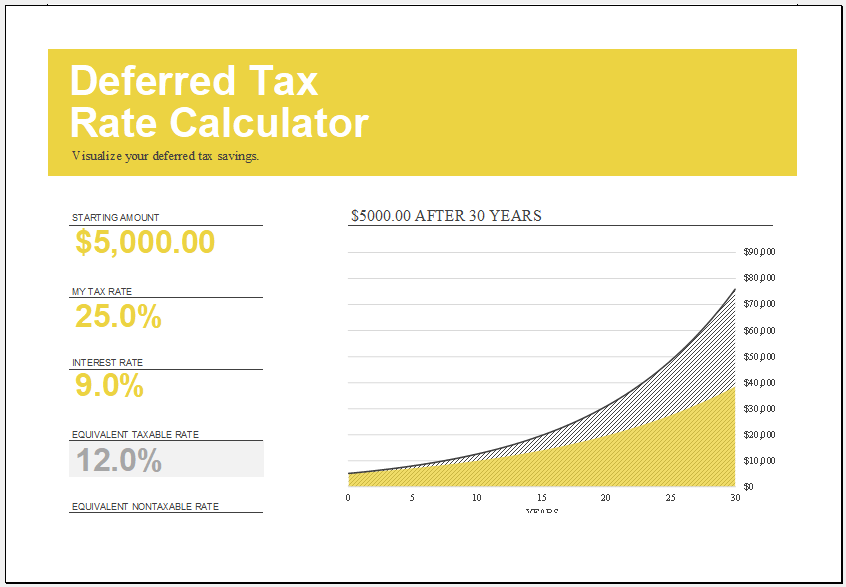
Format: MS Excel (.xlsx)
How the Deferred Tax Rate Calculator Template Works
Our Deferred Tax Rate Calculator Template for Excel is designed to help users evaluate the impact of taxes on investment returns and compare taxable and tax-advantaged earnings.
The template requires only three user inputs:
1. Starting Amount: This is the initial amount of money that will be invested or analyzed. Users simply enter the principal amount they wish to evaluate. The template uses this value as the basis for all calculations and growth projections.
2. Tax Rate: The tax rate represents the percentage of income or investment earnings that may be subject to taxation. Users can enter their applicable tax rate to determine how taxes affect investment returns and equivalent rates.
3. Interest Rate: This field allows users to enter the expected annual rate of return on the investment. The calculator uses this value to determine the relationship between taxable and non-taxable returns.
Automatic Calculations
Once the input values have been entered, the template automatically calculates:
Equivalent Taxable Rate: This calculation shows the taxable interest rate that would be required to achieve the same return as a tax-advantaged or tax-free investment. This helps investors compare different investment opportunities on an equal basis.
Equivalent Non-Taxable Rate: The template also calculates the equivalent non-taxable rate by adjusting the entered interest rate for the selected tax rate. This allows users to understand the effective return after considering taxation.
Long-Term Growth Analysis: The calculator includes formulas that project investment growth over an extended period. Based on the entered starting amount, tax rate, and interest rate, the template can illustrate how an investment may grow over time under different tax conditions.
This feature helps users visualize the long-term effects of taxes on wealth accumulation and better understand the value of tax-deferred or tax-free investment options.
- Business Startup Cost Estimator
- Home Construction Cost Estimator
- Kitchen Remodel Budget Calculator
- Personal Assets and Debts Calculator
- Power Consumption Calculator
- Payroll Calculator Template for Excel
- Food Fat Percentage Calculator Template
- Total Cost of Ownership Calculator Template
- Real Estate Commission Calculator
- Retirement Calculators
- Vehicle Loan Payment Calculator
- Year-end Tax Planning Calculator
- Sales Probability Assessment Calculator
- Travel Expense Calculators
- Sales Commission Calculators
- Mortgage Loan Calculator
- Simple Loan Calculator Template
- Net Present Value Calculator
← Previous Article
Kitchen Remodel Cost CalculatorNext Article →
Life Insurance Needs Calculator