Flexible Manufacturer Budget Sheet
Running any business is not simple. Many factors must be considered and managed daily to ensure that all operations run smoothly. A manufacturer needs to track costs properly to determine whether operations are staying within budget.
Costs may change during a project, so they must be recorded carefully. A manufacturing business includes various operations and expenses such as raw material procurement, labor costs, machine operating costs, shipping, and more. It is essential to record all these expenses and document any changes if a manufacturer wants to calculate the budget accurately. A Flexible Manufacturer Budget Sheet can be very useful in this regard.
What is a Flexible Manufacturer Budget Sheet?
A Flexible Manufacturer Budget Sheet is a financial document that helps manufacturers record and manage various expenses in a flexible manner while keeping available cash flow in consideration. This budget sheet typically includes details such as material costs, labor costs, utility expenses, taxes, employee benefits, and other operational costs.
What does a Flexible Manufacturer Budget Sheet do?
This budget sheet helps manufacturers understand how much money is being spent on different expenses within a specific time period. It allows flexibility by accommodating changes in costs and new or discontinued expenses.
It also helps track variations in expenses and provides a clear overview of overall financial performance.
How to create a Flexible Manufacturer Budget Sheet?
To create an effective Flexible Manufacturer Budget Sheet, consider the following points:
Platform to use:
Choose an appropriate tool to create the sheet. Microsoft Excel is highly recommended as it allows easy calculations, table creation, and data management.
Details to add:
Add a clear heading, including the name of the project or department the budget sheet is for. Also mention the time period it covers, such as monthly, quarterly, or yearly (including dates and year).
Create a table:
Design a table to record expenses. Each expense should be listed in rows. Common categories include:
- Raw materials and supplies
- Labor costs
- Employee benefits
- Utility expenses
- Property taxes
- Insurance
- Machine repair and maintenance
- Purchase of new machinery
- Factory rent
- Other expenses
A total row should be added at the bottom.
Columns may include:
- First Quarter
- Second Quarter
- Third Quarter
- Fourth Quarter
- Total
Ensure there is space to record changes in expenses where needed.
Estimate the budget
Manufacturing expenses can vary, so budgeting must remain flexible. This sheet helps manufacturers calculate the adjust their budget accordingly.
It provides a clear view of all expenses and helps identify whether spending is within limits or exceeding the budget. This allows better financial control and decision-making.
A manufacturer must manage spending carefully to ensure profitability and avoid losses. This budget sheet supports that process by organizing all financial data in one place, reducing confusion and improving planning.
It also helps identify unnecessary expenses so they can be reduced or eliminated. Since the sheet is flexible, it allows easy updates whenever costs increase, decrease, or new expenses are introduced.
Preview
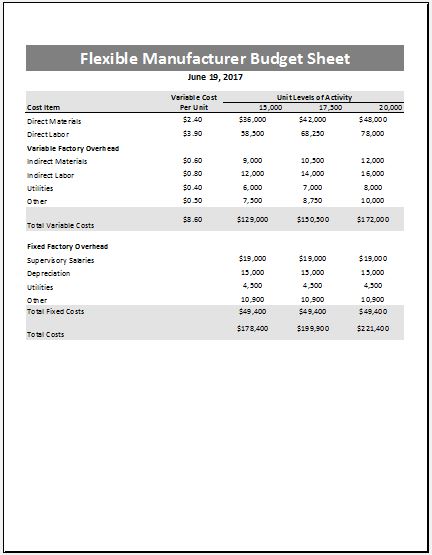
File Size: 49 KB | MS Excel
How this Flexible Budget Sheet Works
Step 1: Set Production Levels
The manufacturer selects expected output levels (e.g., 15,000 –> 20,000 units)
Step 2: Apply Variable Cost Per Unit
Each variable cost is multiplied by the number of units.
Example:
- Direct Material per unit x units produced
- Direct Labor per unit x units produced
So if production increases, these costs automatically increase.
Step 3: Add Fixed Costs
Fixed costs remain unchanged regardless of production level. They are simply added to each column.
Step 4: Calculate Totals
The sheet sums:
- All variable costs
- All fixed costs
- Then combines them into total cost per activity level
Step 5: Budget Comparison & Decision Making
Managers use this output to:
- Compare cost at different production levels
- Identify most cost-efficient output level
- Plan pricing and profitability
- Control overspending
Main Purpose of this Sheet!
The main purpose is to show how total manufacturing cost changes when production volume changes. This helps manufacturers make better financial and production decisions.
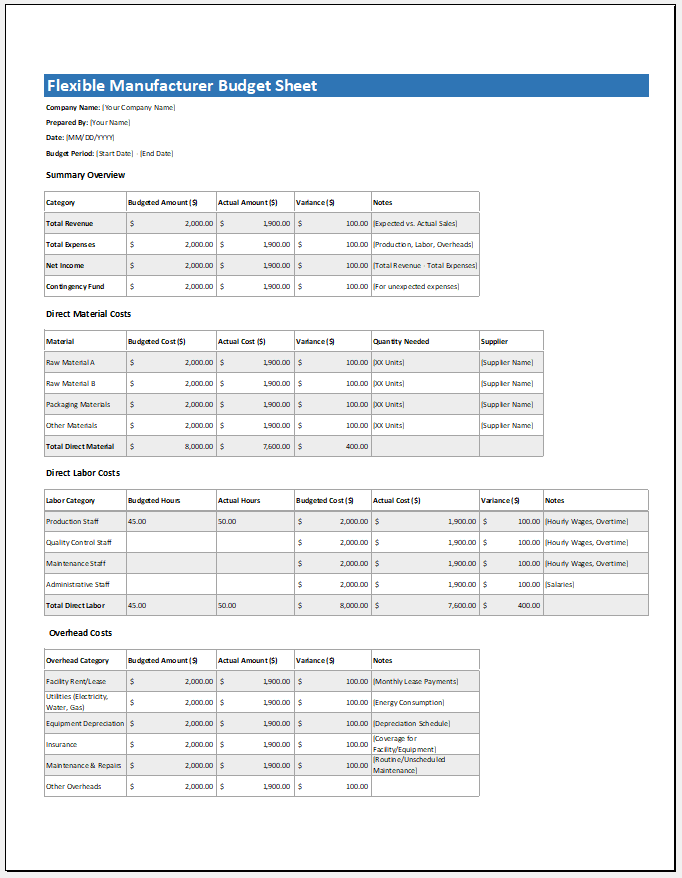
File Size: 49 KB | MS Excel
- Children’s Daily Activity Reward Sheet
- Winter Clothing & Gear Budget Sheet
- Winter Utility Expense Template
- Fuel & Equipment Sheets
- Monthly Attendance Sheet for Employees
- Student Entry & Exit Log
- Gantt Chart for Smaller Projects
- Behavior Log of Child for Schools
- Loan Repayment Tracker
- Product Sales Tracker Template
- Debit Memo Template for Excel
- Winter Attire Inventory
- Financial Projections Worksheet
- Employee Absence Tracker
- Weekly Sales Report Template
← Previous Article
Holiday Shopping Budget TemplateNext Article →
Expense Budget Templates
Leave a Reply