Personal Weight Loss Chart Template
Maintaining a healthy weight is one of the most effective ways to improve overall health and well-being. Whether your goal is to lose a few pounds, improve fitness levels, reduce health risks, or adopt a healthier lifestyle, consistent monitoring is essential. Many people begin a weight loss journey with enthusiasm but struggle to stay motivated because they cannot clearly see their progress over time.
A Personal Weight Loss Chart Template helps solve this problem by providing a structured system for tracking weight, nutrition, fitness activities, and health indicators. By recording important information regularly, individuals can monitor their progress, identify trends, and make informed decisions that support their weight loss goals.
What is a Personal Weight Loss Chart?
A Personal Weight Loss Chart is a tracking tool designed to record and monitor body weight and other health-related measurements over a specific period. It allows users to compare their current progress against their target goals and helps them stay focused on achieving long-term results.
Unlike a simple notebook or diary, a structured Excel-based chart automatically organizes data, performs calculations, and presents progress visually through charts and summaries.
Why Use a Personal Weight Loss Chart?
Many people rely on memory when evaluating their weight loss efforts. However, weight fluctuations can occur due to various factors such as diet, hydration, exercise, and lifestyle habits. Keeping accurate records provides a clearer picture of what is working and what needs improvement.
A weight loss chart helps users:
- Monitor weight changes consistently
- Stay motivated through visible progress
- Track nutrition and calorie intake
- Evaluate exercise effectiveness
- Identify unhealthy habits
- Set realistic goals and deadlines
- Maintain accountability throughout the weight loss journey
Key Benefits of Using a Weight Loss Chart
1. Tracks Progress Accurately
Regular weight entries help users measure actual progress instead of relying on assumptions. Seeing gradual improvements can be highly motivating.
2. Encourages Consistency
Recording information daily or weekly encourages discipline and helps maintain healthy habits.
3. Supports Better Nutrition Decisions
Tracking protein, carbohydrates, fats, sugar intake, and water consumption provides valuable insight into eating patterns.
4. Monitors Health Indicators
Weight loss is not the only measure of health. Monitoring blood pressure, pulse rate, and breathing rate helps users understand their overall wellness.
5. Improves Goal Achievement
Setting a target weight and deadline provides direction and makes it easier to stay committed to a plan.
6. Provides Visual Motivation
Graphs and charts make progress easier to understand and help users stay encouraged throughout their journey.
Information Commonly Included in a Personal Weight Loss Chart
A comprehensive weight loss chart may contain:
- Starting date
- Starting weight
- Target weight
- Height measurements
- Body Mass Index (BMI)
- Daily or weekly weight records
- Calories burned
- Protein intake
- Carbohydrate intake
- Fat consumption
- Sugar intake
- Water consumption
- Blood pressure readings
- Resting pulse rate
- Breathing rate
- Notes and observations
Keeping all of this information in one place provides a complete overview of health and fitness progress.
Tips for Effective Weight Tracking
To obtain meaningful results:
- Weigh yourself at the same time each day or week.
- Use the same scale whenever possible.
- Focus on long-term trends rather than daily fluctuations.
- Record information consistently.
- Track nutrition and exercise along with weight.
- Review progress regularly and adjust goals when necessary.
Why Excel is Ideal for Weight Loss Tracking
Microsoft Excel makes weight tracking easier by automatically performing calculations and generating visual reports. Users can quickly update information, monitor trends, and review historical data without complicated manual calculations.
Excel also allows for customization, enabling users to tailor the worksheet to their personal goals and preferences.
About Our Personal Weight Loss Chart Template
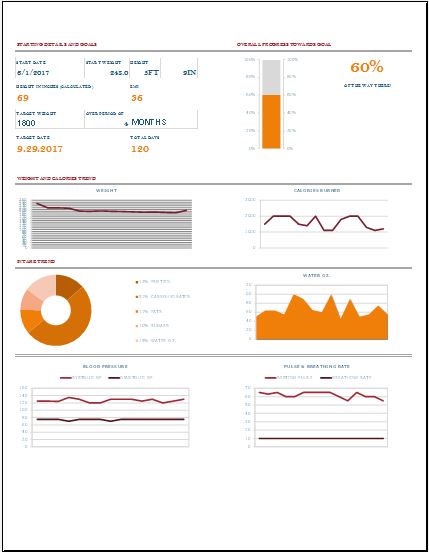
Our Personal Weight Loss Chart Template is a comprehensive health and fitness tracking tool designed to help users monitor every stage of their weight loss journey. The template includes a dedicated dashboard displaying starting weight, target weight, BMI calculations, target dates, and overall progress toward goals.
The data entry section allows users to record daily weight measurements, calories burned, nutritional intake including protein, carbohydrates, fats, sugars, and water consumption. In addition, the template tracks important health indicators such as systolic and diastolic blood pressure, resting pulse rate, and breathing rate.
A visual dashboard automatically summarizes progress through charts and graphs, making it easy to analyze trends and stay motivated. The template also includes a BMI reference sheet that helps users understand their weight category based on established BMI ranges.
With automatic calculations, organized data entry fields, and visual progress monitoring, this template provides a complete solution for managing weight loss and improving overall health.
File Size: 181 KB
MS Excel [.xls]
- Children’s Daily Activity Reward Sheet
- Winter Clothing & Gear Budget Sheet
- Winter Utility Expense Template
- Fuel & Equipment Sheets
- Monthly Attendance Sheet for Employees
- Student Entry & Exit Log
- Gantt Chart for Smaller Projects
- Behavior Log of Child for Schools
- Loan Repayment Tracker
- Product Sales Tracker Template
- Debit Memo Template for Excel
- Winter Attire Inventory
- Financial Projections Worksheet
- Employee Absence Tracker
- Weekly Sales Report Template
← Previous Article
Business Model CanvasNext Article →
Hourly Service Invoice Template
Leave a Reply