Task Timeline Worksheet
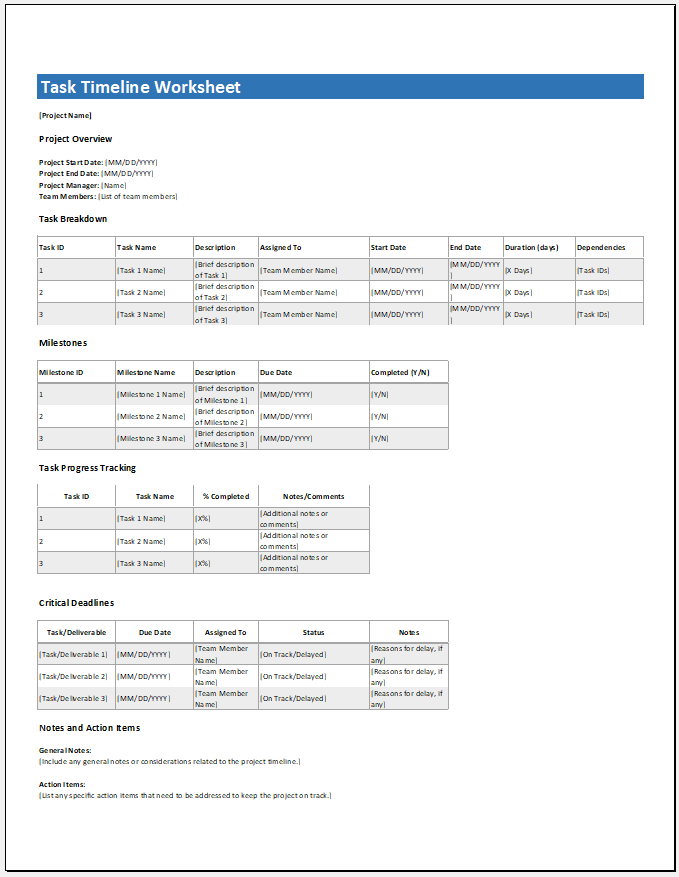
When working on a project or trying to complete tasks within a specified time, it is essential to create a clear timeline. Projects often involve multiple activities that must be managed within limited timeframes. A Task Timeline Worksheet helps you organize these activities efficiently.
It allows you to break down a project into smaller, manageable steps and assign each step a specific time period for completion. By doing so, you can maintain better control over your workflow and ensure that every task progresses smoothly without delays. It also helps in tracking progress, avoiding confusion, and ensuring that all tasks are completed in a systematic and timely manner.
With the help of a task timeline, you can easily determine:
- Which task needs to be performed
- When it should be completed
- How to complete it within the given timeframe
This worksheet is especially useful for individuals who want to manage their tasks in a structured and organized way.
Importance of a Task Timeline
A task timeline simplifies project management by providing a clear overview of all activities. When multiple tasks are involved, it becomes crucial to track each one to ensure nothing is overlooked.
Using this worksheet allows you to:
- Stay focused on every task
- Avoid missing deadlines
- Manage workload efficiently
- Ensure smooth workflow throughout the project
Key Features of the Worksheet
This Task Timeline Worksheet is designed to be simple and user-friendly. It includes built-in tools that help you easily list, organize, and track your activities.
Some key features include:
- Easy task entry and tracking
- Clear visualization of task durations
- Organized structure for better planning
- Ability to manage multiple tasks simultaneously
Even complex and time-consuming tasks become easier to handle when organized within this template.
Task Prioritization and Management
To achieve the best results, each task should be managed based on:
- Priority level
- Time allocation
- Resource availability
This ensures that all tasks are completed effectively within the given time constraints. The worksheet helps you structure your work in a way that improves efficiency and productivity.
This Task Timeline Worksheet is a valuable tool for:
- Project managers
- Team leaders
- Event planners
- Anyone responsible for organizing tasks
It provides a clear and visual record of ongoing and upcoming tasks, making project tracking easier and more effective.
A Task Timeline Worksheet is designed to make task management simple, structured, and efficient. Before using the template, it is important to understand that it works as a planning tool that visually organizes all your activities in a clear sequence. By preparing your tasks in advance and setting proper start and end dates, you can ensure better time management and smoother execution of your project from beginning to end.
How to Use the Template
Follow these simple steps to get started:
- Download the Template
Save a copy of the template to your local computer. - Extract the File
The file is in .zip format. Extract it in the same folder by right-clicking and selecting “Extract Here.” - Open the File
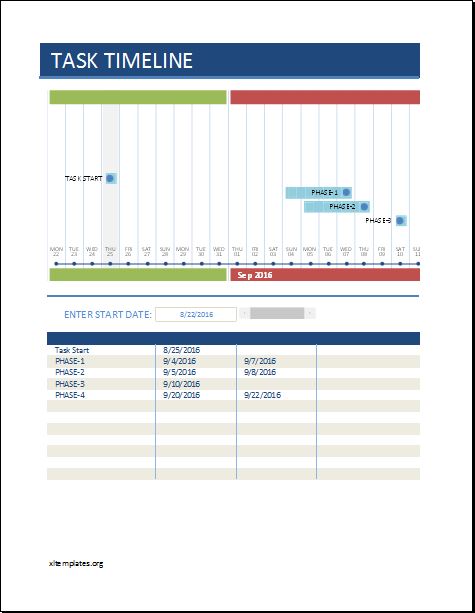
Open the extracted file using Microsoft Excel. - Understand the Layout
The template has a user-friendly layout designed for easy navigation and efficient use. - View the Chart Section
A pre-designed chart is included at the top. You do not need to modify it, as it is already formatted. - Enter Task Details
Below the chart, you will find columns labeled:- ACTIVITY
- START
- END
- NOTES
Enter the details for each task along with its start and end dates.
- Automatic Chart Update
Each activity you enter will automatically appear in the chart area for visual tracking. - Break Tasks into Phases
You can divide larger tasks into smaller phases to better monitor progress. - Add More Rows
Insert additional rows if you have more tasks to include. - Use the Timeline Slider
A slider is provided below the chart to scroll through the timeline. Move it left or right to view hidden sections.
Final Note
Once all tasks are entered, your Task Timeline Worksheet will automatically help you monitor progress and stay on track. It ensures that even complex projects are handled in a clear, organized, and efficient manner.
We hope you find this template useful and easy to use. If you have any questions or need clarification regarding this template, please feel free to leave a comment below. We will do our best to help you with any issues you may face while using it. Thank you!
Excel Template File: 341 KB
Excel Template File: 341 KB
- Children’s Daily Activity Reward Sheet
- Winter Clothing & Gear Budget Sheet
- Winter Utility Expense Template
- Fuel & Equipment Sheets
- Monthly Attendance Sheet for Employees
- Student Entry & Exit Log
- Gantt Chart for Smaller Projects
- Behavior Log of Child for Schools
- Loan Repayment Tracker
- Product Sales Tracker Template
- Debit Memo Template for Excel
- Winter Attire Inventory
- Financial Projections Worksheet
- Employee Absence Tracker
- Weekly Sales Report Template
← Previous Article
Time Management WorksheetNext Article →
Workout Schedule & Tracker
Leave a Reply