House Renovation Budget Template
Renovating a home is an exciting project that can improve comfort, functionality, and property value. However, home renovations often become more expensive than expected when there is no proper financial planning. Many homeowners start a renovation project with enthusiasm but later face budget overruns, unexpected expenses, and incomplete work. In some cases, renovation costs can even exceed the original estimate by a significant amount, forcing homeowners to postpone or cancel parts of the project.
One of the main reasons renovation projects fail is poor budgeting. Without a clear financial plan, it becomes difficult to track expenses, prioritize tasks, and control spending. This is where a Home Renovation Budget Template becomes extremely useful. It helps homeowners organize renovation costs, allocate funds to different areas of the project, and monitor spending throughout the renovation process.
What is a Home Renovation Budget Template?
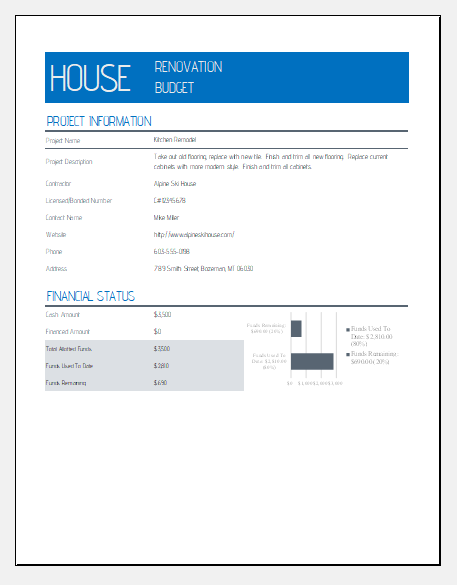
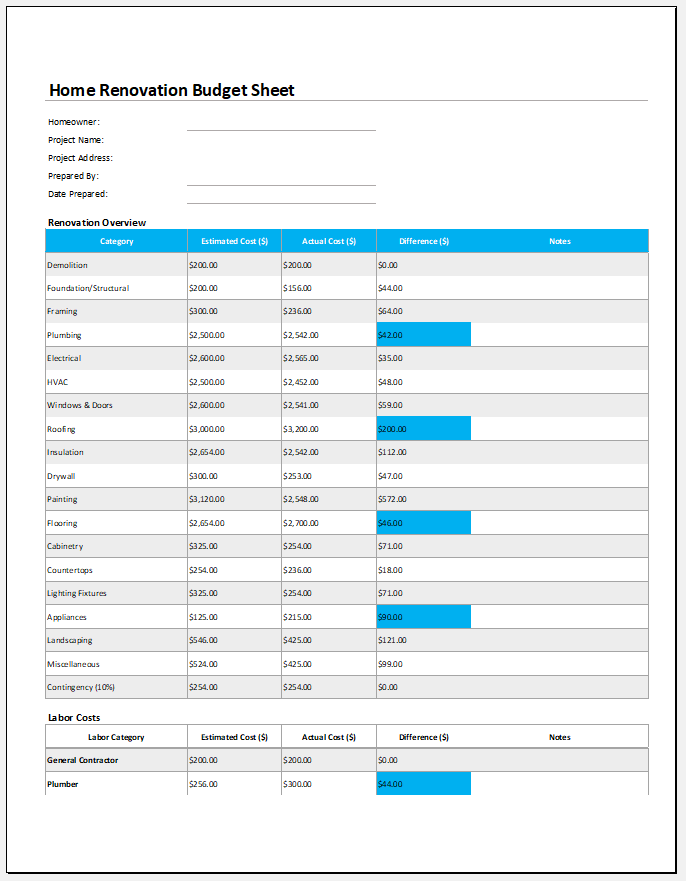
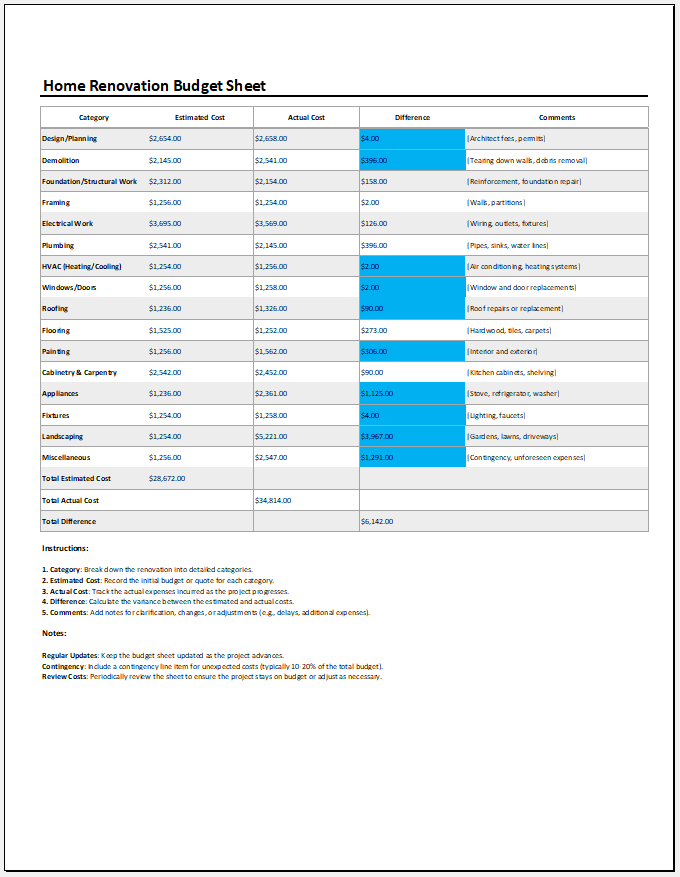
A Home Renovation Budget Template is an Excel spreadsheet designed to help homeowners plan and manage renovation expenses. The template allows users to enter estimated and actual costs for different renovation activities, such as construction, painting, flooring, plumbing, electrical work, furniture, fixtures, and decor.
The template automatically organizes the data and provides a clear overview of the renovation budget. Many templates also include charts, graphs, and summaries that make it easier to analyze spending patterns and compare planned costs with actual expenses. This allows homeowners to identify budget overruns early and make informed decisions before costs get out of control.
Why is Budget Planning Important for Home Renovation?
Proper budgeting is one of the most important steps in any renovation project. A well-planned budget helps homeowners:
- Estimate the total renovation cost before work begins.
- Avoid unnecessary spending and financial stress.
- Prioritize essential repairs and improvements.
- Track expenses throughout the project.
- Identify cost overruns quickly.
- Allocate funds efficiently to different renovation areas.
- Complete the project without exhausting available resources.
When you know exactly how much money is available and where it will be spent, you can make better decisions and reduce the risk of unexpected financial problems.
Factors That Affect Renovation Costs
Several factors influence the total cost of a home renovation project.
Size of the Property
The larger the home, the higher the renovation cost is likely to be. More rooms, larger floor areas, and additional materials increase both labor and material expenses.
Age and Condition of the House
Older homes often require extensive repairs before cosmetic improvements can be made. Problems such as damaged wiring, plumbing issues, leaking roofs, or structural weaknesses can significantly increase renovation costs.
Scope of Renovation
A simple repainting project costs much less than a complete kitchen remodel or a full-house renovation. Understanding the scope of work is essential for creating an accurate budget.
Quality of Materials
The choice of materials has a major impact on renovation expenses. Premium flooring, luxury fixtures, and high-end finishes can substantially increase the overall project cost.
Labor Costs
Contractor fees, electricians, plumbers, carpenters, and other skilled workers contribute significantly to the renovation budget. Labor rates vary depending on location and project complexity.
How to Create a Home Renovation Budget
Creating a renovation budget does not have to be complicated. Follow these simple steps:
1. Define Your Renovation Goals
Start by identifying the purpose of the renovation. Some homeowners renovate to increase property value, while others want to improve comfort, functionality, or appearance. Your goals will influence the overall budget.
2. Inspect Your Home
Carefully evaluate the condition of your house. Identify repairs that must be completed before focusing on cosmetic improvements. Structural and safety-related issues should always take priority.
3. Measure the Renovation Area
Determine the size of the rooms or areas that require renovation. Accurate measurements help estimate material quantities and labor requirements more effectively.
4. List All Expected Expenses
Create a detailed list of renovation costs, including:
- Construction materials
- Labor charges
- Flooring
- Paint and finishing materials
- Plumbing work
- Electrical work
- Fixtures and fittings
- Furniture and décor
- Permits and inspections
5. Prioritize Needs Over Wants
If you have a limited budget, distinguish between essential repairs and optional upgrades. Focus first on improvements that are necessary for safety, functionality, and long-term value.
6. Set Aside a Contingency Fund
Unexpected expenses are common during renovation projects. It is generally recommended to reserve an additional 10% to 20% of the total budget for unforeseen costs.
7. Track Expenses Regularly
As the renovation progresses, compare actual spending against your planned budget. This helps prevent overspending and keeps the project financially manageable.
Benefits of Using Our Home Renovation Budget Template
Our Home Renovation Budget Template for Excel simplifies the budgeting process by providing a structured format for planning and tracking renovation expenses. The template helps users organize costs, monitor spending, compare estimated and actual expenses, and view financial summaries through easy-to-read charts and reports.
Whether you are renovating a single room or an entire house, this template helps you stay organized, make informed financial decisions, and complete your renovation project within budget. By using a reliable budgeting tool, you can reduce financial stress and focus on transforming your house into the home you envision.
Preview
File Format: MS Excel [.xlsx]
Excel Spreadsheet Template
Excel Spreadsheet Template
- Children’s Daily Activity Reward Sheet
- Winter Clothing & Gear Budget Sheet
- Winter Utility Expense Template
- Fuel & Equipment Sheets
- Monthly Attendance Sheet for Employees
- Student Entry & Exit Log
- Gantt Chart for Smaller Projects
- Behavior Log of Child for Schools
- Loan Repayment Tracker
- Product Sales Tracker Template
- Debit Memo Template for Excel
- Winter Attire Inventory
- Financial Projections Worksheet
- Employee Absence Tracker
- Weekly Sales Report Template
← Previous Article
Monthly Mileage LogsNext Article →
Odometer Log Templates