Monthly Food Budget Template
A Monthly Food Budget Template is a simple yet highly effective financial tracking tool designed to record, monitor, and manage all food-related expenses within a month. It allows you to clearly track spending on groceries, fruits, vegetables, meat, beverages, snacks, and dining out.
By maintaining this template, you can easily understand your spending patterns, control unnecessary expenses, and make smarter financial decisions. Over time, it helps improve budgeting discipline and supports better financial stability.
Purpose of a Monthly Food Budget Sheet
The main purpose of a monthly food budget sheet is to provide a structured overview of your food expenditures. Instead of guessing where your money goes, this template gives you a clear breakdown of every purchase.
It helps you:
- Monitor daily and monthly food expenses
- Identify overspending categories
- Compare prices over time
- Improve budgeting habits
- Reduce food waste and unnecessary purchases
Key Elements of a Monthly Food Budget Sheet
A well-designed food budget sheet is more than just a list of expenses. It is a structured system that organizes all necessary details for accurate tracking and analysis.
Below are the essential components you should include:
1. Platform (Microsoft Excel): This template is best created in Microsoft Excel or similar spreadsheet software. Excel allows you to:
- Organize data in a structured format
- Use formulas for automatic calculations
- Generate summaries and totals
- Reduce manual errors
2. Title / Heading: Add a clear title at the top such as “Monthly Food Budget Template”. This helps identify the purpose of the sheet instantly.
3. Table Structure: Create a structured table where each row represents a single transaction. Each column should capture specific details of the expense for better clarity and analysis.
4. Date: Record the date of each purchase. This helps track spending patterns over time and identify high-cost days or weeks.
5. Category: Classify each expense into relevant categories such as:
- Groceries
- Fruits & Vegetables
- Meat & Poultry
- Beverages
- Snacks
- Dining Out
This makes it easier to analyze where most of your money is going.
6. Item Description: Enter the name of the item purchased (e.g., rice, apples, chicken, soft drink). This provides clarity on individual purchases.
7. Quantity: Record the number of units purchased. This helps in understanding consumption levels and controlling overbuying.
8. Price per Item: Enter the cost of a single unit. This is useful for comparing prices across different stores and time periods.
9. Total Cost: Calculate the total cost of each item using the formula:
Total Cost = Quantity × Price per Item
In Excel, you can automate this using:
=QuantityCell * PriceCell
10. Purchase Source: Mention where the item was purchased, such as:
- Local grocery store
- Supermarket
- Restaurant
- Online delivery service
This helps identify the most cost-effective shopping sources.
11. Regular Updates: To maintain accuracy, update the sheet daily or immediately after each purchase. This ensures that no expense is missed and keeps your budget reliable.
Sample Table StructureDate Category Item Quantity Price per Item Total Cost Source 01-05-2026 Groceries Rice 2 kg 250 500 Supermarket 01-05-2026 Beverages Milk 2 L 180 360 Grocery Store
Advantages of Using a Monthly Food Budget Template
Using this template offers several important benefits:
- Provides a clear overview of monthly food spending
- Helps track and compare prices over time
- Encourages disciplined financial planning
- Ensures proper allocation of food budget
- Identifies unnecessary or excessive expenses
- Supports long-term savings and better money management
About This Template
This Monthly Food Budget Template is designed to simplify expense tracking and improve financial control over daily food purchases. Whether you are managing a household budget, planning personal expenses, or tracking business-related food costs, this template provides a structured and easy-to-use system.
With consistent use, it helps you build better financial awareness, reduce wasteful spending, and maintain a balanced monthly budget without stress.
Option #1
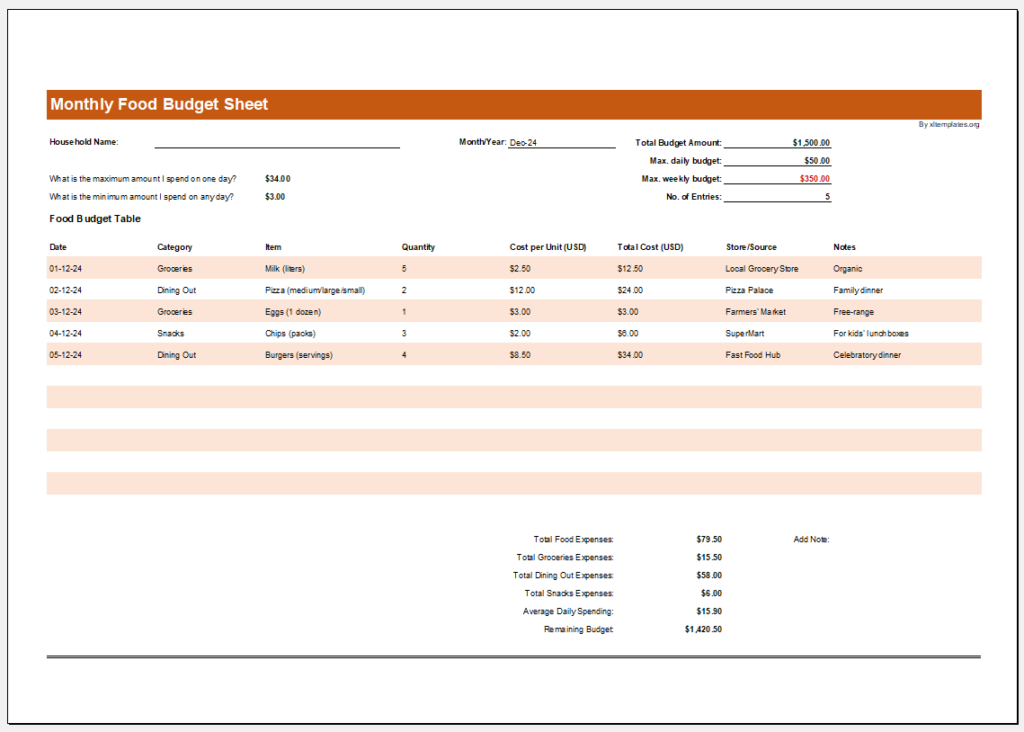
Key features:
-> Automatically calculate the total cost for each item.
-> Flag days or categories that exceed a specified daily/weekly budget.
-> Let you input the monthly food budget (e.g., $500) and calculate the remaining amount.
Option #2
- Winter Clothing & Gear Budget Sheet
- Budget Vs Actual Statement
- Vehicle Mortgage Payment Calculator
- Spending and Savings Worksheet
- Personal Financial Transaction Register Template
- Wedding Expense Sheet Template
- Living Expense Calculator Template
- School Farewell Party Budget Worksheet
- Recreational Activity Budget Worksheet
- Friends Trip Budget Worksheet
- One Day Party Budget Worksheet
- Daily Food Expense in Office Worksheet
- Bar-b-que Party Budget Worksheet
- Summer Party Budget Worksheet
- Office Party Budget Worksheet
- Music Concert Budget Worksheet
- Welcome Party Budget Worksheet
- Annual Dinner Budget Worksheet
← Previous Article
Customer Contact List Template for ExcelNext Article →
Printable Petty Cash Log