Home Office Tax Comparison Benefits Sheet
Many self-employed professionals, freelancers, consultants, and small business owners operate their businesses from home. One of the advantages of running a business from home is the ability to claim certain home office tax deductions. These deductions can reduce taxable income and help lower overall tax liability.
However, claiming a home office deduction is not always as straightforward as it seems. While the deduction may provide immediate tax savings, it can also affect depreciation calculations and create additional taxable gain when the property is sold. Therefore, it is important to evaluate both the short-term and long-term tax consequences before deciding to claim a home office deduction.
A Home Office Tax Benefits Comparison Sheet helps users estimate these financial effects and compare the overall benefits of using part of their home for business purposes.
What is a Home Office Tax Benefits Comparison Sheet?
A Home Office Tax Benefits Comparison Sheet is an Excel-based financial planning tool designed to estimate the tax advantages and potential future tax costs associated with claiming a home office deduction.
The worksheet allows users to enter information about their home, office space, annual expenses, and business income. Based on these inputs, the spreadsheet calculates:
- Business-use percentage of the home
- Deductible home office expenses
- Depreciation deductions
- Estimated tax savings over multiple years
- Potential taxable gain when the home is sold
- Estimated tax due on the sale of the property
By presenting these calculations side by side, the worksheet helps users determine whether claiming the deduction provides a meaningful long-term financial benefit.
Why Compare Home Office Tax Benefits?
Many taxpayers focus only on the immediate deduction available each year. However, claiming a home office deduction may require depreciation of the business portion of the property. When the home is eventually sold, some of this depreciation may be recaptured and taxed.
A comparison worksheet helps users understand:
- How much tax can be saved annually
- How depreciation affects future tax obligations
- The impact of business-use percentage on deductions
- Whether the tax savings outweigh future tax costs
- Long-term financial consequences of claiming deductions
This broader perspective helps business owners make more informed tax planning decisions.
Information Required for the Comparison
To generate accurate estimates, users typically enter information such as:
- Purchase price of the home
- Value of the land
- Cost of permanent improvements
- Date the home office was placed into service
- Fair market value of the property
- Total square footage of the home
- Square footage used for business
- Annual mortgage interest
- Property taxes
- Insurance costs
- Utilities
- Repairs and maintenance expenses
- Other indirect business-related expenses
The worksheet uses these figures to calculate allowable deductions and tax projections.
Benefits of Using a Home Office Tax Benefits Comparison Sheet
A structured worksheet offers several advantages:
Better Tax Planning
Users can estimate future tax savings before filing their returns and make informed decisions regarding home office deductions.
Accurate Expense Allocation
The worksheet automatically applies the business-use percentage to eligible expenses, reducing manual calculations.
Long-Term Analysis
Instead of focusing solely on current-year deductions, the worksheet evaluates multiple years of projected tax benefits.
Depreciation Tracking
The spreadsheet helps monitor depreciation deductions that may affect future tax liabilities.
Property Sale Impact Evaluation
Users can estimate how much tax may be due when the property is sold after claiming home office deductions.
Improved Financial Decision-Making
The comparison helps determine whether claiming a home office deduction is financially advantageous over the long term.
How to Use the Worksheet
Using the Home Office Tax Benefits Comparison Sheet is simple:
- Enter property purchase information.
- Specify the office area and total home area.
- Input annual household expenses.
- Enter business income estimates.
- Review calculated home office deductions.
- Analyze projected tax savings.
- Examine estimated tax consequences upon sale of the property.
- Compare total benefits against potential future tax obligations.
The worksheet automatically performs calculations and presents the results in an organized format.
About The given Excel Template
This Home Office Tax Benefits Comparison Sheet Template consists of four interconnected worksheets designed for comprehensive tax-benefit analysis.
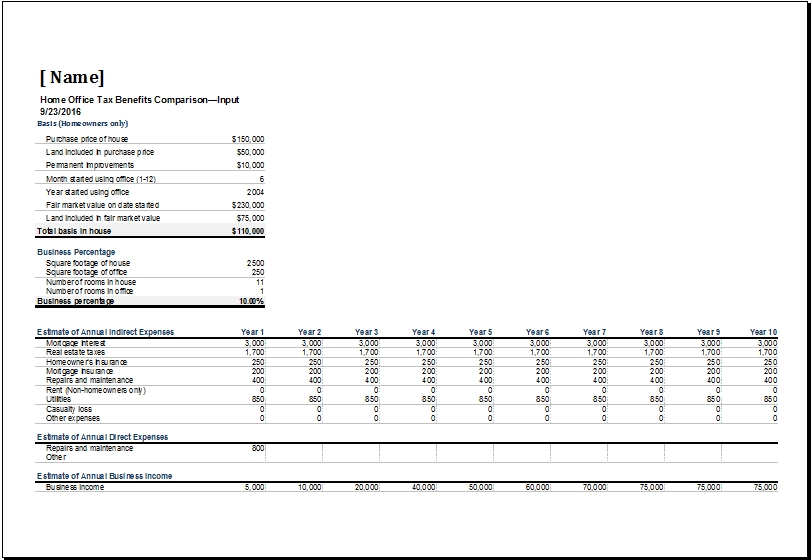
The Input sheet collects property details, office size information, business-use percentages, and annual home-related expenses. Based on these entries, the workbook calculates deductible expenses associated with business use of the home.
The Tax Savings from Deduction sheet estimates annual tax savings over a ten-year period. It calculates indirect expenses, direct expenses, depreciation, total business-use expenses, and potential carryover amounts. This allows users to see the cumulative value of claiming a home office deduction over time.
The Tax on Sale sheet evaluates the potential tax consequences of selling the property. It calculates adjusted basis, depreciation claimed, gain on sale, taxable gain, and estimated tax due, helping users understand future tax exposure.
Finally, the Supporting Tables sheet contains depreciation schedules and calculation tables used throughout the workbook to ensure accurate projections.
Overall, this template is a valuable planning tool for homeowners and self-employed individuals who want to compare the long-term benefits and costs of claiming a home office deduction before making important tax decisions.
- Children’s Daily Activity Reward Sheet
- Winter Clothing & Gear Budget Sheet
- Winter Utility Expense Template
- Fuel & Equipment Sheets
- Monthly Attendance Sheet for Employees
- Student Entry & Exit Log
- Gantt Chart for Smaller Projects
- Behavior Log of Child for Schools
- Loan Repayment Tracker
- Product Sales Tracker Template
- Debit Memo Template for Excel
- Winter Attire Inventory
- Financial Projections Worksheet
- Employee Absence Tracker
- Weekly Sales Report Template
← Previous Article
Special Order Pricing TemplateNext Article →
Business Planning Checklist Template
Leave a Reply