Manufacturing Output Chart Template
Most manufacturing businesses set clear daily, weekly, or monthly production targets. Monitoring manufacturing output is essential because it helps evaluate the efficiency and performance of the production team. Regular tracking ensures that the business is operating in alignment with its planned goals and production capacity.
By reviewing manufacturing output on a daily basis, companies can analyze variations in production levels over time. This makes it easier to identify trends, inefficiencies, or improvements in the production process. One effective way to manage and visualize this data is by using a Manufacturing Output Chart Template.
Importance of Tracking Manufacturing Output
In any manufacturing environment, consistency and efficiency are key factors for success. Even small fluctuations in production can have a significant impact on delivery schedules, customer satisfaction, and overall operational costs.
Without a proper tracking system, businesses may struggle to understand whether production goals are being met or where delays are occurring. Manual tracking methods or unorganized records often lead to errors, confusion, and poor decision-making.
A structured approach to recording output helps management gain clear visibility into daily performance. It also supports better coordination between departments such as production, inventory, and supply chain. Over time, this data becomes valuable for forecasting demand, planning resources, and improving productivity.
A Manufacturing Output Chart Template provides a simple yet effective solution to manage all this information in one place. It ensures that production data is recorded consistently and can be easily analyzed whenever needed.
What is a Manufacturing Output Chart Template?
A Manufacturing Output Chart Template is an Excel worksheet used by businesses to record the number of units, components, or products manufactured within a specific time period, such as daily, weekly, monthly, or quarterly.
The collected data helps organizations evaluate production performance and improve manufacturing efficiency. By maintaining consistent records, companies can make informed decisions regarding resource allocation, workforce planning, and production scheduling.
This template plays an important role in managing manufacturing operations by systematically tracking output across different time periods. It allows businesses to monitor production trends, compare performance, and identify areas that require improvement.
Tips for Creating a Manufacturing Output Chart Template:
To ensure clarity and effectiveness, the Manufacturing Output Chart Template should be designed carefully and structured in a user-friendly way. Below are some useful guidelines:
1. Format of the Output Chart
The template should begin with a clear heading such as “Manufacturing Output Chart.” It is also recommended to include the company name, logo, and the reporting period (e.g., week, month, or year).
You may also include fields for:
- Department or production unit name
- Supervisor or in-charge person
- Shift details (if applicable)
The layout should remain clean and simple so that users can quickly understand and update the information without confusion.
2. Adding Relevant Details
A well-organized table should be created to record production data. Common columns may include:
- Product Name
- Product Code (if applicable)
- Production Date
- Planned Output
- Actual Output
- Difference (Variance)
- Remarks or Notes
Each product should be listed on a separate row for better clarity and tracking.
If tracking is done daily, columns can be arranged according to dates or days of the week. For monthly tracking, each column can represent a specific week or total monthly output. This structure can easily be adapted in Microsoft Excel for better visualization and calculation.
3. Analyzing Manufacturing Output
Manufacturing businesses need accurate information about what is being produced and in what quantity. Without proper tracking, it becomes difficult to evaluate production efficiency or ensure that output meets demand.
A Manufacturing Output Chart helps identify whether production levels are optimal, too low, or excessively high. Overproduction can lead to unnecessary storage costs, resource wastage, or spoilage in case of perishable goods. On the other hand, underproduction may result in unmet demand and lost business opportunities.
By analyzing recorded data, companies can adjust production plans, improve resource utilization, and reduce operational inefficiencies.
Benefits of Using the Chart
A Manufacturing Output Chart provides several advantages, including:
- Improved production tracking and transparency
- Better decision-making based on real data
- Easy identification of production trends
- Enhanced efficiency in resource planning
- Reduced wastage and improved cost control
It also helps management clearly communicate production performance across teams and departments.
Our Template
Our Manufacturing Output Chart Template is designed to simplify production tracking and performance analysis for manufacturing businesses of all sizes. It provides an easy-to-use format in Microsoft Excel, allowing users to efficiently record daily or periodic output data.
The template includes customizable fields, automated calculations, and a clean layout that helps users quickly analyze production trends without complexity. Whether you are managing a small workshop or a large manufacturing unit, our template helps you stay organized, improve efficiency, and make data-driven decisions with confidence. Given below is the MS Excel template for your help.
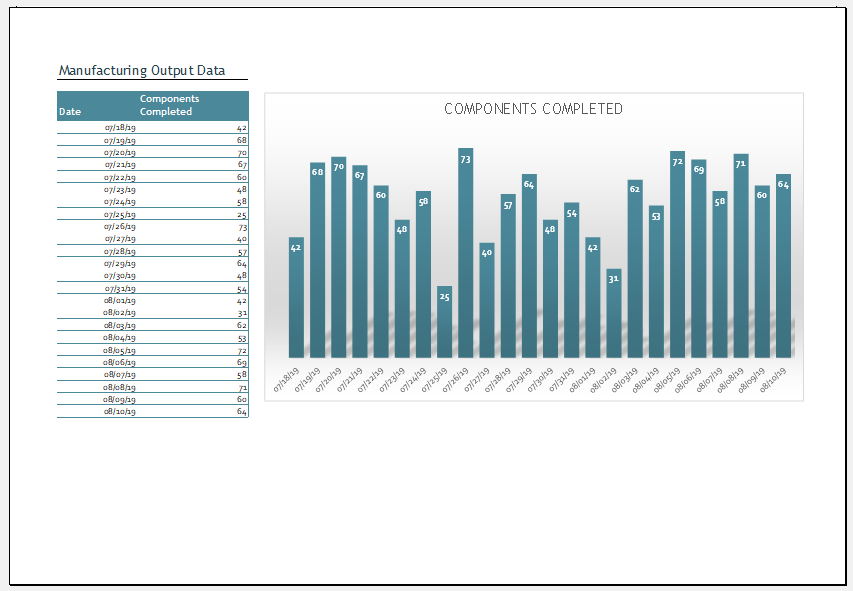
Format: MS Excel -File Size: 67 KB
- Children’s Daily Activity Reward Sheet
- Winter Clothing & Gear Budget Sheet
- Winter Utility Expense Template
- Fuel & Equipment Sheets
- Monthly Attendance Sheet for Employees
- Student Entry & Exit Log
- Gantt Chart for Smaller Projects
- Behavior Log of Child for Schools
- Loan Repayment Tracker
- Product Sales Tracker Template
- Debit Memo Template for Excel
- Winter Attire Inventory
- Financial Projections Worksheet
- Employee Absence Tracker
- Weekly Sales Report Template
← Previous Article
Organizational ChartsNext Article →
Summer Activity Calendar Template