Regional Sales Report Template
Sales play a vital role in the growth and sustainability of any business. For companies operating across multiple locations, understanding regional sales performance becomes even more important. Each region contributes differently to overall success, and tracking this performance helps identify opportunities, challenges, and areas that need improvement.
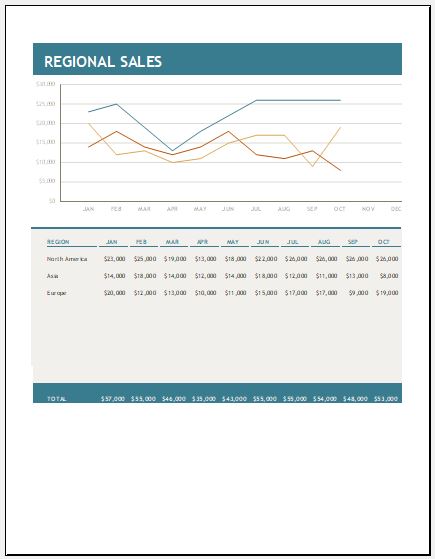
A regional sales report template is a structured document designed to present and analyze sales data for specific geographic regions. It allows businesses to monitor performance, compare results across locations, and make informed strategic decisions.
What is a Regional Sales Report Template?
A regional sales report template is a pre-designed document or spreadsheet that organizes key sales metrics for a particular region. It provides a clear and systematic way to evaluate how well a region is performing in terms of revenue, units sold, and target achievement.
By using this template, businesses can efficiently track sales activities and gain insights into which regions are performing well and which require attention.
Importance of Regional Sales Reporting
A regional sales report gives business owners and managers a clear picture of company performance across different locations. It helps in:
- Identifying high-performing and underperforming regions
- Monitoring business growth trends
- Understanding market dynamics in each region
- Supporting data-driven decision-making
For example, if a region shows lower sales, management can investigate the reasons and take corrective actions such as improving marketing strategies, adjusting pricing, or strengthening distribution channels.
Key Components of the Template
To prepare an effective regional sales report, the following details should be included:
- Report Date – When the report is created
- Department Name – Sales or relevant division
- Region Details – Names of cities, areas, or territories
- Product Information – Items or services sold in each region
- Sales Data – Revenue, units sold, and targets
These elements ensure that the report is complete, organized, and useful for analysis.
How It Works
The regional sales report template allows businesses to:
- Record sales data for each region over a specific period (monthly, quarterly, or annually)
- Compare performance across regions
- Identify trends and patterns
- Evaluate whether sales targets are being met
Companies may also conduct meetings with area sales managers or gather customer feedback to better understand regional performance and improve results.
Structure of the Template
A well-designed template typically includes a table format with:
- A column for each region
- Columns for time periods (e.g., months)
- Sales figures for each period
- A total column to calculate overall sales per region
- A summary row to calculate totals across all regions
Tools like Microsoft Excel or Google Sheets are commonly used to create such templates, as they allow automatic calculations and data visualization through charts.
Benefits of Using a Template
Using a regional sales report template offers several advantages:
- Ensures consistent data collection and reporting
- Makes it easy to compare performance across regions
- Helps identify trends, strengths, and weaknesses
- Supports better and faster decision-making
- Saves time with a ready-to-use format
Limitations to Consider
While useful, these templates may have some limitations:
- Limited flexibility for unique or complex sales scenarios
- Possibility of human error during manual data entry
- May require customization for specific business needs
Tips for Creating an Effective Template
When designing a regional sales report template, keep the following points in mind:
1. Use a Professional Layout
Include the company name, report title (e.g., Regional Sales Report), and reporting period. Keep the format clean and easy to understand.
2. Organize Data in Tables
Use structured tables to record regional data, monthly performance, and totals. This improves readability and analysis.
3. Keep It Simple
Avoid unnecessary complexity. Include only relevant fields to ensure ease of use.
4. Use Digital Tools
Applications like Microsoft Excel can automate calculations, reduce errors, and provide visual insights through charts and graphs.
Conclusion
A regional sales report template is an essential tool for businesses operating in multiple locations. It helps track performance, compare regions, and identify areas for improvement. By using a well-structured template, companies can make smarter decisions, allocate resources effectively, and drive overall business growth.
File Size: 24 KB -Format: MS Excel
- Children’s Daily Activity Reward Sheet
- Winter Clothing & Gear Budget Sheet
- Winter Utility Expense Template
- Fuel & Equipment Sheets
- Monthly Attendance Sheet for Employees
- Student Entry & Exit Log
- Gantt Chart for Smaller Projects
- Behavior Log of Child for Schools
- Loan Repayment Tracker
- Product Sales Tracker Template
- Debit Memo Template for Excel
- Winter Attire Inventory
- Financial Projections Worksheet
- Employee Absence Tracker
- Weekly Sales Report Template
← Previous Article
Deposit Record TemplateNext Article →
Cash Reconciliation Sheet Template
Leave a Reply