Remote Work Attendance Tracker Template
In today’s evolving work environment, tracking employee attendance has become more important than ever—especially for remote teams. Organizations need a reliable and structured system to monitor when employees are working, how many hours they complete, and when they are absent.
A well-designed attendance tracking system ensures transparency, improves accountability, and supports accurate payroll processing. For remote teams in particular, it plays a vital role in maintaining productivity, consistency, and trust across distributed workplaces.
What Is a Remote Work Attendance Tracker?
A Remote Work Attendance Tracker is a tool used to record and monitor the attendance of employees who work outside a traditional office environment.
Remote work may include:
- Working from home
- Co-working spaces
- Private or shared offices
- Any other location outside the main workplace
This tracker helps organizations maintain clear and accurate records of employee attendance, absences, and working hours in flexible work settings.
Purpose and Importance
As remote work continues to grow, businesses require efficient systems to manage distributed teams. Unlike traditional office environments—where attendance can be observed directly—remote work requires a structured digital approach.
A remote attendance tracker helps organizations:
- Maintain accurate attendance records
- Ensure employee accountability
- Improve workforce transparency
- Streamline team management and reporting
A remote attendance tracker is more than just a record-keeping tool. It plays a vital role in managing day-to-day operations of distributed teams. By systematically capturing work hours and attendance details, it provides a clear picture of employee activity and helps organizations maintain discipline, transparency, and efficiency in a remote work environment.
Key Functions of a Remote Attendance Tracker
A remote attendance tracker is designed to simplify workforce monitoring by capturing essential daily work details in a structured format. It ensures that all attendance-related information is recorded and can be easily reviewed whenever needed. A properly designed tracker performs several essential functions:
- Records employee check-in and check-out times
- Tracks total daily working hours
- Monitors attendance status (Present, Absent, Leave, Half-day)
- Maintains monthly attendance history
- Helps calculate total hours worked for payroll processing
With these details, employers can easily evaluate productivity, ensure schedule compliance, and address any attendance-related issues effectively.
How to Create an Effective Tracker
To build a reliable attendance tracker, it is important to use a structured and organized approach.
1. Use a Suitable Tool
Microsoft Excel or Google Sheets is highly recommended because it allows you to:
- Create organized tables
- Apply automatic formulas for calculations
- Reduce manual errors
- Customize the layout according to your needs
2. Add a Clear Title
Start your sheet with a professional heading such as:
“Remote Work Attendance Tracker”
This immediately defines the purpose of the document and improves clarity.
3. Design the Attendance Table
Include essential columns such as:
- Employee Name / ID
- Date
- Day of the Week
- Check-in Time
- Check-out Time
- Total Hours Worked
- Attendance Status
- Remarks
You may also create separate sheets for each month and clearly label them with the month and year for better organization.
To get the most out of a remote attendance tracker, it is important to design and use it in a way that remains practical and easy for everyone involved. A well-structured system not only improves accuracy but also ensures that employees can quickly update their details without confusion. Following a few simple practices can greatly enhance the effectiveness and reliability of the tracker over time.
Best Practices for a Good Tracker
An effective attendance tracker should be:
- Simple and easy to use
- Clearly structured and well-organized
- Free from unnecessary or confusing details
- Professionally formatted for readability
A clean layout helps reduce errors and ensures smooth daily usage.
Benefits of Using a Remote Attendance Tracker
A well-maintained tracker provides several advantages:
- Efficient management of remote teams
- Better monitoring of employee working patterns
- Accurate payroll and overtime calculations
- Early identification of attendance issues or absenteeism
- Reliable records for performance evaluation
In case of disputes or clarifications, the tracker also serves as a trusted reference for both employers and employees.
Final Note
We have created a ready-to-use MS Excel Remote Work Attendance Tracker Template designed to meet all your needs. It is simple, structured, and efficient -helping you manage remote teams with ease and accuracy.
We hope you will find it useful and enjoy using it for your daily attendance management.
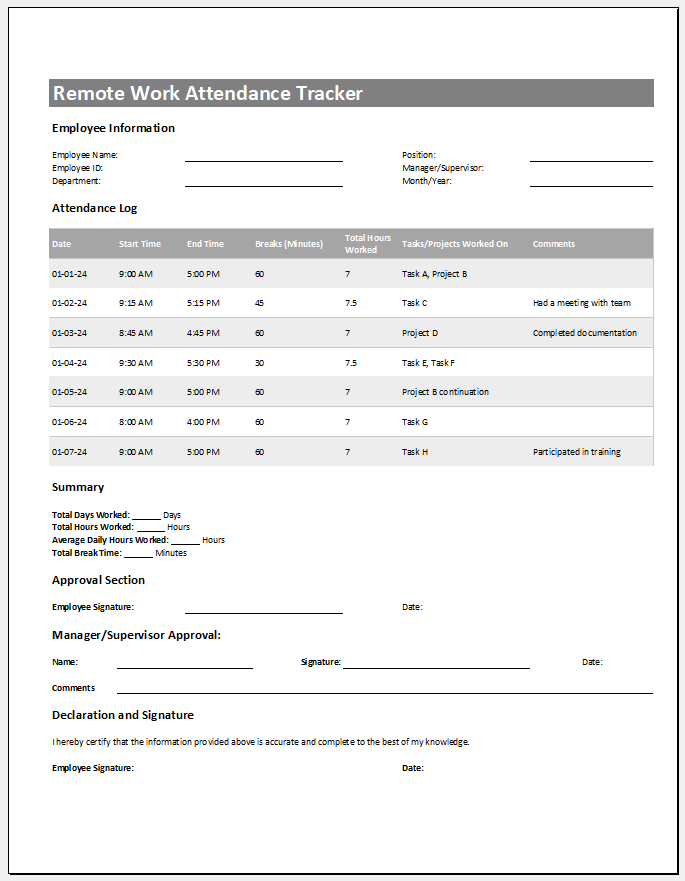
Excel Template File: 86 KB
- Children’s Daily Activity Reward Sheet
- Winter Clothing & Gear Budget Sheet
- Winter Utility Expense Template
- Fuel & Equipment Sheets
- Monthly Attendance Sheet for Employees
- Student Entry & Exit Log
- Gantt Chart for Smaller Projects
- Behavior Log of Child for Schools
- Loan Repayment Tracker
- Product Sales Tracker Template
- Debit Memo Template for Excel
- Winter Attire Inventory
- Financial Projections Worksheet
- Employee Absence Tracker
- Weekly Sales Report Template
← Previous Article
Mileage Expense Report TemplateNext Article →
Budget Vs Actual Statement